
YouTube Watch Later Alternative: Tube Stash
Tube Stash is an AI-organized Watch Later for YouTube. It is a browser extension for YouTube management. Considering all the problems with the existing Watch Later of YouTube, like too many clicks to save videos into watch later, being unable to organize YouTube watch later into categories, etc., Tube Stash which is a YouTube watch later organizer was created as a YouTube Watch Later alternative for people who would like to save a lot of YouTube videos easily into organized folders or categories.
The problems with YouTube’s Watch Later
YouTube’s Watch Later has problems.
Too many clicks to save a video
To add a video to Watch Later, you have to click several buttons. On the YouTube homepage, you have to first click the three dots and then click Watch Later. This can be mildly inconvenient, but over a long time it could add up and deter you from adding lots of videos into Watch Later.
Everything goes into one big list
Watch Later is one list where videos all get added in one big list. Since it takes two clicks to add to a bulk list called Watch Later on YouTube, you end up having to make a decision to choose one video over everything else that is on a homepage or other YouTube pages. Or you end up opening different YouTubevideos in different browser tabs which leads to cluttered YouTube tabs.
Hard to get back to your videos
To navigate to Watch Later, you first have to click YouTube’s sidebar button, then choose Watch Later from it, which takes you to a whole new YouTube Watch Later page. Then you have to either select the video you want from the list or click Play all, which starts from the beginning.
Since over time nobody goes to remove the videos that they have already watched, your Watch Later list could have accumulated thousands of videos. This could be inconvenient, which could deter someone from using Watch Later.
No search and no bulk actions
On YouTube’s Watch Later, you cannot directly search for a specific video.
On YouTube, if you have added several videos into a specific playlist, you cannot select videos in bulk and change their playlist or delete a set of selected videos in bulk.
How Tube Stash solves them
Save a video in one click
Tube Stash allows you to add videos to Watch Later in just one click. This makes it much easier to add videos to Watch Later than what YouTube currently has. Over a long time you will notice why this can make your life so much easier and will encourage you to add videos to Watch Later. Hence Tube Stash is a better and simple watch later alternative to YouTube's own watch later.
Save straight into categories
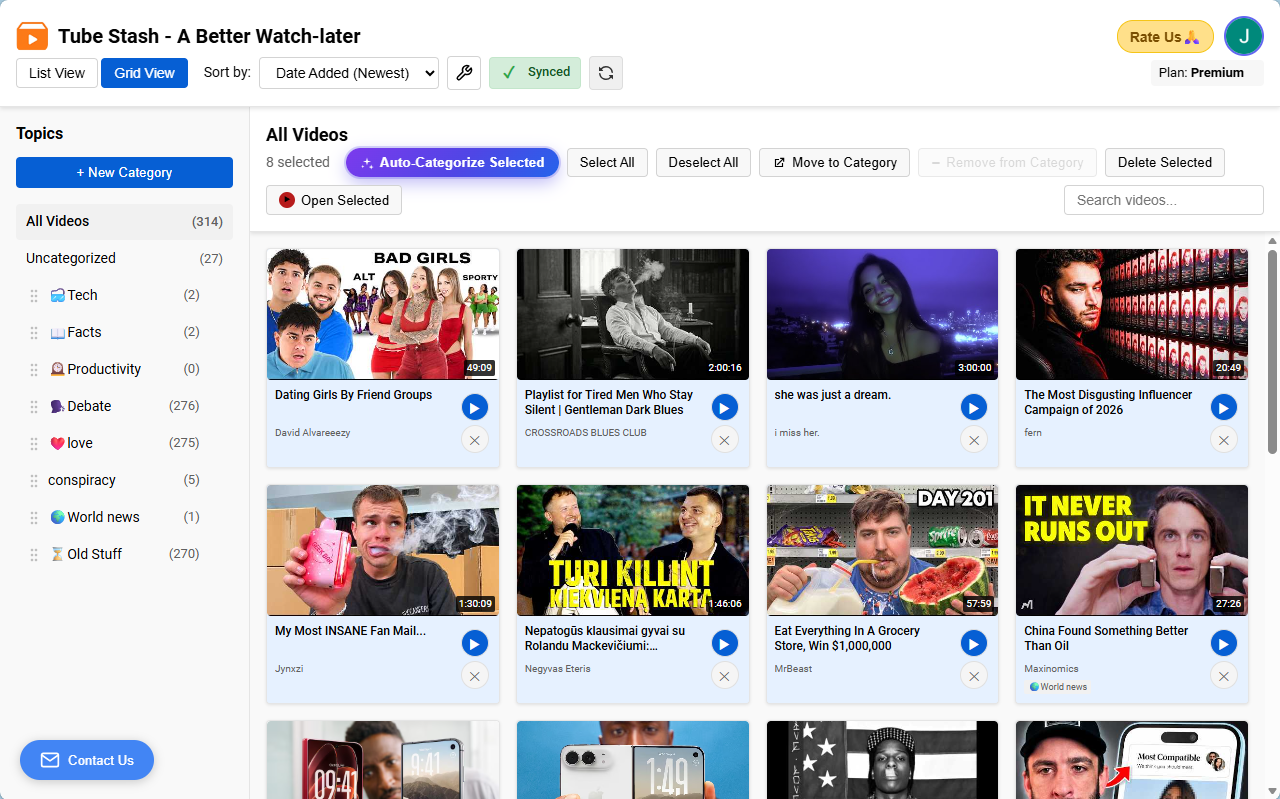
Tube Stash lets you create multiple categories and add a video to any of them in just one click. Most importantly, you can add videos to a category directly with just one click. This means you are organized right from the get-go. No more having to do several clicks to add to a category. Instead of one big Watch Later list that has all the videos you ever added, you can now organize your videos into categories and access them very easily.
Never choose one video over another
With Tube Stash you never have to choose one YouTube video over another. You can save all the videos you want to watch in one click per video. You never have to choose between two YouTube videos just because adding a video to Watch Later and watching it from there could be inconvenient.
Category suggestions
Tube Stash suggests a category name based on all the videos you have added to different categories. Tube Stash learns your previous categorization and suggests a category name when adding a video to Watch Later, so that you don’t even have to think or look for the right category to add the video to. This saves the mental load of thinking, having to do several clicks, and a cluttered Watch Later list containing all the videos in one list.
Auto-categorize with AI
If you decide not to add videos to categories directly when adding them, you can always later open Tube Stash’s collections page, select all the videos in the Uncategorized category, and click Auto-categorize. This makes the AI look at all the videos you have already organized into categories and categorize the selected videos according to your previous categorization in just one click.
Then all you have to do is preview the categorization made by AI and accept only what looks right. You can deselect the videos AI has wrongly categorized and only accept the ones you are happy with. This way you can keep your YouTube videos organized, with almost no effort from your side, into the categories they belong to.
In 2026, with the advent of AI, you no longer have to be thinking about saving YouTube videos to the right categories. AI can do it for you automatically in bulk in just a few clicks.
Get to your latest video fast
With Tube Stash, all you have to do is open the side panel. The latest video you have added is on the top of the list, and all you have to do is click play, either on YouTube or on the mini player. Just two clicks to navigate and play, which can be super helpful over the long run. Hence we built Tube Stash as a simpler, much easier watch later alternative to YouTube’s own Watch Later system.
Search, sort and organize
Search: On Tube Stash, you can easily search for a video using the search feature, which lets you search based on anything you remember about the video title or channel name.
Sort by date added: Sort your YouTube videos by date added, in either ascending or descending order.
Sort alphabetically: Sort your YouTube videos alphabetically.
Coming in future versions: More sorting options like channel name, unwatched videos, how much of the video you have watched, video length, etc.
Bulk move: On Tube Stash, you can select YouTube videos in bulk and, with the click of a few buttons, move them to a different category. You can always reorganize YouTube videos at a later time with ease.
Bulk delete: You can also empty watch later videos in organized Watch Later categories in bulk by selecting them and removing all of them at once. This way you can clear watch later videos very easily in just a few clicks.
Backup and sync across devices
Most importantly, all your videos are backed up automatically in the cloud once you sign in to Tube Stash, so that you will never lose your Watch Later list with videos organized into categories or folders.
If you go to a different browser or a computer, your Watch Later videos organized into different categories are synced, just like you would get access to your YouTube Watch Later and playlists anywhere. All you have to do to access your saved videos is install the Tube Stash extension on that browser and sign in to your account using either your email and password or your Google account.
A queue and a side-panel mini player
Not only does Tube Stash act as a YouTube Watch Later alternative, but it can also be an alternative to YouTube’s queue feature.
Queue
With Tube Stash you can add videos to the queue in just one click.
Videos added to the queue get deleted automatically in two days, unlike YouTube’s queue, which gets deleted as soon as you close YouTube or close the browser.
You can also reorganize the videos in the queue to play them in whatever order you like.
Once a video is finished, it is removed from the queue and placed in the Watched section so that the queue stays clean and tidy.
You can clear all the videos in the queue at once by clicking Clear queue.
Videos saved in collections are permanent, whereas videos added to the queue are temporary and get deleted two days after adding them. However, you can change that from a few hours to 30 days if you upgrade to Premium.
Mini player in the side panel
Tube Stash offers a mini player in the side panel, which helps you watch YouTube videos on the background without YouTube, meaning you don’t have to load an entire YouTube watch page just to watch a video.
You can watch YouTube videos on the side in the mini player while using other apps on the web, or while browsing the web or browsing the YouTube homepage or other YouTube pages for even more videos to add to your Queue or the organized Watch Later list of categories.
If you ever get curious about the comments for that video, the comments are also available under the mini player.
Autoplay
Both the temporary queue and Watch Later offer an autoplay feature that lets you play the entire YouTube video queue, or the Watch Later videos in a category, one after another. It works both in the mini player on the side panel and on the YouTube watch page itself.
Who Tube Stash is for
Tube Stash is for people who use YouTube a lot: Tube Stash is a YouTube watch later tool that can act as a YouTube watch later assist for people who watch a lot of YouTube videos and would like to save a lot of YouTube videos without much hassle and be able to access them very easily when they need to watch.
If you are a YouTube addict, this Tube Stash extension can help you because you don’t have to watch any YouTube video immediately. You can just add them all to Watch Later and watch during your intentional YouTube watching time. Also, one click to save videos or add to the queue means no more opening new YouTube tabs, which clears the YouTube tab clutter that often comes with being a YouTube addict.
Conclusion
Hence, this Watch Later alternative extension comes with many features that YouTube’s native Watch Later and queue don’t offer. Overall, the Tube Stash browser extension can be a great alternative to YouTube’s native Watch Later and queue, especially if you are a heavy YouTube user and prefer convenience, simplicity, and more functionality.
One click into the right category.