
Answer to Clickbait YouTube videos in a Click
You see a video titled “I tried the thing nobody believed would work” and you decide to open it to find out what that thing is. You end up watching the video for 40 minutes and finally find out what the thing was.
If YouTube clickbait titles annoy you, Tube Stash is a Chrome extension that gets you the answer without having to open the video and watch the whole video.
The YouTube clickbait problem
Clickbait titles are bad for viewers. They promise an answer, a result or a secret, and then make you sit through intros, sponsor segments and filler to reach it. Many people feel clickbaiting is getting worse, and the problem is compounded by a second trend: YouTube videos are getting longer. A video can run 40 minutes, and the answer to its title may be a single sentence near the end.
Without a good way to avoid clickbait on YouTube, your options are to scrub through the timeline hoping to find the answer, read the comments, or give up and watch the whole thing.
How Tube Stash answers the title
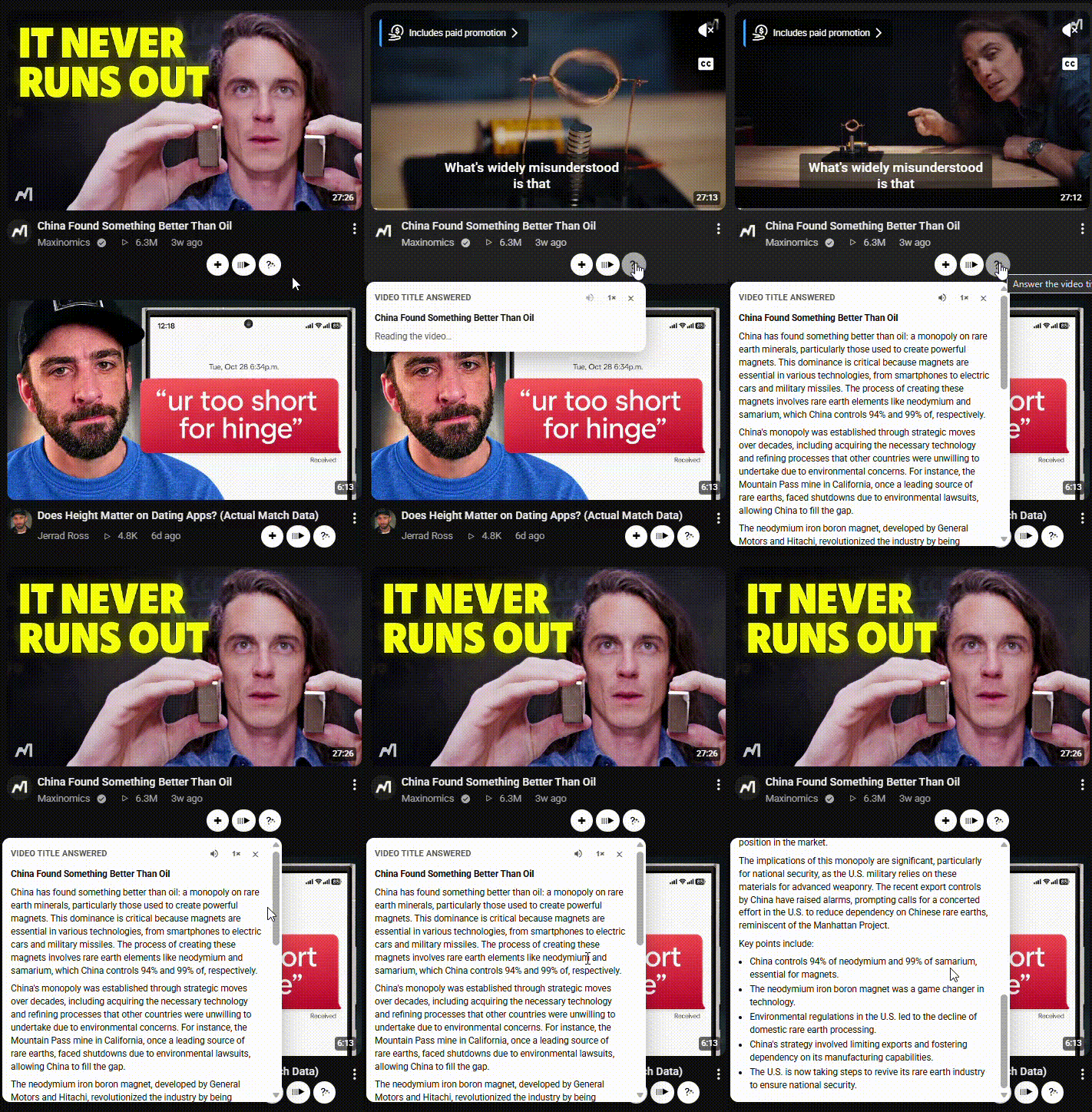
Tube Stash adds a title answer button under YouTube videos. One click does this:
It reads the video’s title and its transcript.
It works out what the title promised.
It gives you the answer, to the point, right under the video.
The answer is based on what the title actually promised, rather than a vague overview of the video.
The answer opens under the video
You can see whether the title was worth a full watch without sitting through it. On YouTube, the usual path is to open the video and wait until the point shows up. Tube Stash puts the answer under the video you are already looking at.
More than an answer: a video summary
Because the feature works from the transcript, it also works as a YouTube video summarizer. Along with the answer, you get a short summary of what the video covers, so you can decide whether the full video is worth your time.
Listen instead of read
Click the speaker button and Tube Stash reads the title answer out loud. This is handy when you’re cooking, working, or just don’t want to read.
Why use it
Save time. Skip a 40-minute video when the answer takes ten seconds to read.
Decide before you watch. If the answer and summary interest you, watch the video. If not, move on.
Stop rewarding bad titles. You get the information without spending your time and attention on a misleading headline.
Less frustration. Clickbait titles stop being annoying when you can see what’s behind them in a click.
Works with your workflow. Save promising videos to your collections and let the rest go.
It’s a feature you won’t find in YouTube itself, and it comes alongside Tube Stash’s other tools: one-click saving into categories, a side-panel queue and mini player, and AI auto-categorizing. It’s an easy way to deal with the YouTube clickbait problem without leaving YouTube.
Save the video to watch later only if the answer is worth watching the whole video
The buttons on the video can also save it into a category. That save is separate from the answer. If you want the video later, put it in a folder you name instead of leaving another tab open. How categories work is on organize your YouTube Watch Later. The Tube Stash home page shows the rest of the extension.

Frequently asked questions
Is clickbait allowed on YouTube?
YouTube’s policies prohibit misleading titles, thumbnails and descriptions meant to trick viewers, but enforcement is inconsistent and the line between “catchy” and “misleading” is blurry. As a result, plenty of clickbait stays up, which is why a tool like this is useful.
Is this a YouTube clickbait title remover?
No. Tube Stash doesn’t change or rewrite titles on YouTube. It gives you the answer the title promised, so the title stops mattering.
Is it a clickbait bot?
Not exactly. There’s no chatting involved. You click one button under a video and the answer appears.
Does it work on every video?
It works when the video has a public transcript available. Videos without one, such as some music videos or very new uploads, may not work.
Can the answer be wrong?
The answer is generated from the transcript with AI, so it can occasionally miss nuance. For anything important, watch the relevant part of the video to confirm.
Does it sign in to my YouTube account?
No. Tube Stash doesn’t sign in to your YouTube account or read your watch history.
Answer the title before you watch.